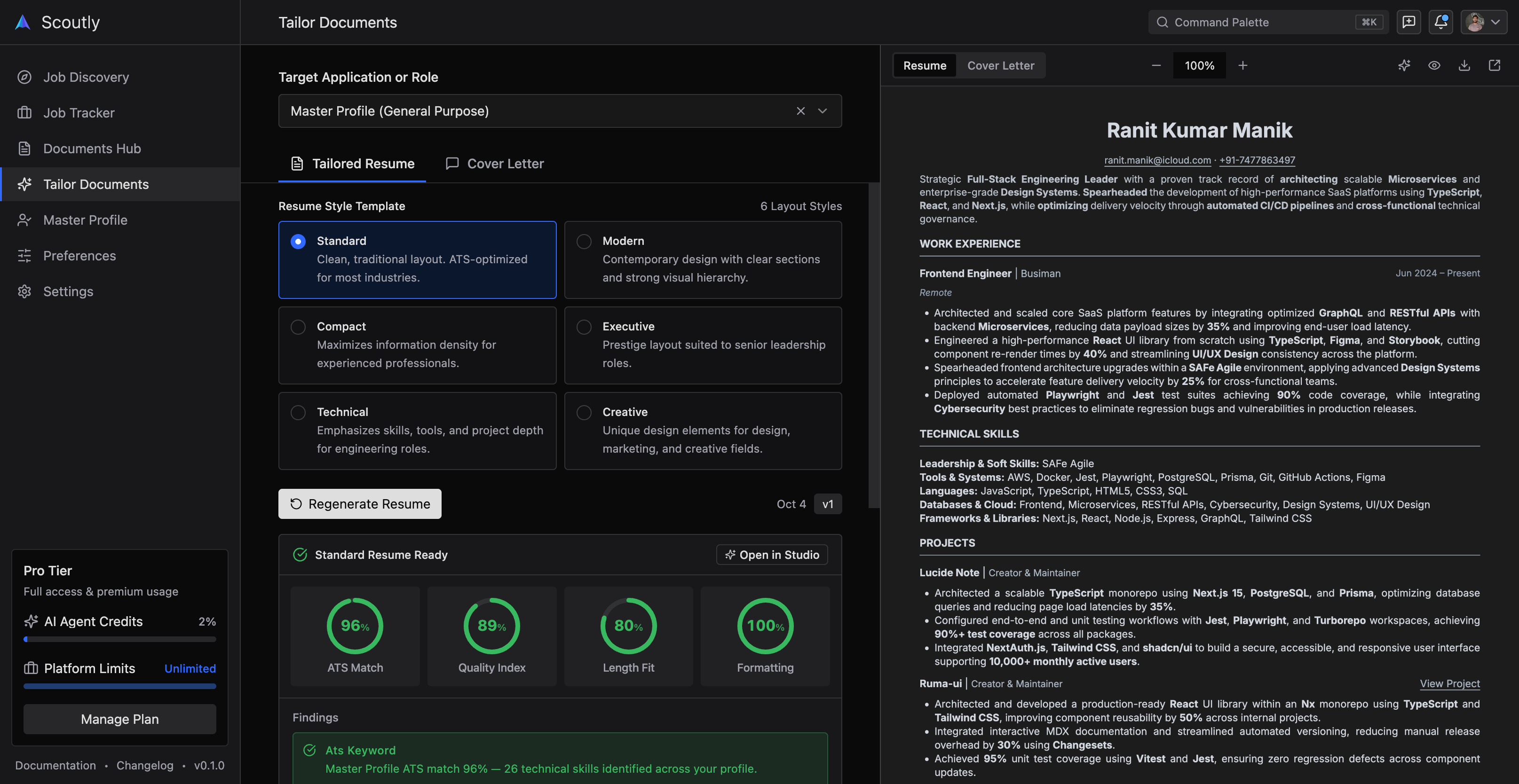
1. Six Recruiter-Approved ATS Templates
Every template is built on an uncompromising single-column linear architecture, ensuring 100% clean parsing through Workday, Ashby, Greenhouse, and Lever. You can switch between any template instantly inside the studio without losing data:
Standard — Universal Enterprise Single-Column
Time-tested single-column layout with clean horizontal section rules and conservative typography. Delivers maximum baseline parsing compatibility across Workday, Taleo, SAP, and legacy enterprise screeners. Best for Enterprise, Finance, Consulting, and Corporate Operations roles.
Modern — Contemporary Scaleup & Product Teams
Balanced contemporary spacing with clear visual section boundaries and refined role-to-company grouping. Engineered for high scannability by both automated screeners (Ashby, Greenhouse) and human recruiters. Best for Tech Startups, Scaleups, and Product Teams.
Compact — High-Density 1-Page Architecture
Tightened line leading and margin presets engineered to fit 5+ years of extensive career history onto a single crisp page without awkward trailing lines or cutoffs. Best for Senior Engineers, Tech Leads, and Systems Architects.
Technical — Systems & Engineering Stack Centric
Brings technical skills taxonomy, language proficiencies, frameworks, and architecture milestones front and center. Integrates repository coordinates and quantifiable STAR metric bullets. Best for Software Engineers, DevOps, SREs, and Data Scientists.
Executive — Leadership & Organizational Trajectory
Refined letterhead typography emphasizing career progression, organizational scale, budget management, and revenue outcomes. Highlights executive summaries and board appointments. Best for Engineering Managers, Directors, and VPs.
Creative — Distinctive Accents & Editorial Flair
Tasteful accent highlights and balanced portfolio coordinates crafted for candidates who want visual personality without breaking linear ATS parsing rules. Best for Product Designers, UX Researchers, and Developer Advocates.
2. Single-Column ATS Standards & Architecture
Over 75% of resumes are never seen by human recruiters due to layout traps like multi-column grids, embedded tables, and unreadable graphical frames. Scoutly ensures your document compiles cleanly:
Single-Column Semantic Stream
Every template uses an uncompromised single-column layout. Avoids table traps and multi-column scrambles that cause legacy ATS parsers to skip career history.
Clean OpenType Vector Characters
Unlike graphics exported from design tools, every document compiles clean, searchable unicode text that enterprise screeners can tokenize with 100% accuracy.
Accomplishment-Driven Metric Formats
Structured experience editors prompt for quantifiable metrics and Google XYZ formulations (Accomplished [X], measured by [Y], by doing [Z]).
Real-Time Single-Page Height Budget
A visual page meter alerts you immediately if your content exceeds a single page, letting you adjust margins and font size in one click.
Strict Industry Section Hierarchy
Standardized section headings (Work Experience, Education, Technical Skills) prevent algorithmic rejection from custom or creative header titles.
Local In-Browser Privacy
Your draft is stored safely in your browser's local storage. Documents are compiled on your machine with zero server round-trips or data mining.
3. Four-Step Creation & Export Workflow
Build and export an interview-ready resume in minutes without paywalls, account registration, or unexpected credit card requirements:
Select an ATS Layout
Choose from 6 templates calibrated for corporate and startup screeners
Pick a layout suited for your industry—Standard for enterprise, Modern for startups, Compact for senior engineers, or Technical for developers.
- All templates adhere strictly to single-column ATS parsing algorithms
- Instantly switch between templates anytime without losing typed data
- Zero multi-column tables, text frames, or unreadable graphical elements
Input Career Milestones
Structured forms guide you through impact-driven content
Fill in your career details using structured field editors. Focus on achievements, technical tools, and measurable business outcomes.
- Dedicated fields for contact information, professional summary, and experience
- Technical skills categorization (Languages, Frameworks, Tools, Competencies)
- Project showcases with live repository links and architecture notes
Tune Spacing & Margins
Keep your resume strictly on one page without awkward cutoffs
Use real-time typography and spacing controls to adjust margins, font family, and font size while observing the live canvas preview.
- 6 professional typefaces suited for corporate and tech applications
- One-click margin presets (Compact, Standard, Relaxed) to fit single-page budgets
- Instant live preview updates in sub-200ms directly in your browser
Export Vector PDF Free
Download high-resolution, selectable vector PDFs with zero watermarks
Click export to generate a crisp vector PDF ready for job applications. No sign-up walls, credit card forms, or hidden download limits.
- 100% free with unlimited PDF downloads
- Zero watermarks or trial subscription gotchas
- Selectable text stream fully compatible with Workday, Ashby, and Greenhouse
4. Scoutly vs. Generic Online Resume Builders
How Scoutly's free in-browser builder compares against traditional subscription-gated tools:
| Capability | Scoutly Free Builder | Legacy Paid Builders |
|---|---|---|
| Pricing & Download Access | 100% Free Forever (Unlimited PDF Downloads, No Signup) | Hidden paywall after creating resume ($2.95 trial to $39/mo) |
| Document Watermarks | Zero Watermarks on any exported document | Forced watermarks or low-resolution output unless paid |
| ATS Text Layer Quality | Clean selectable vector text stream with UTF-8 encoding | Flattened images or nested HTML tables that scramble in parsers |
| Single-Page Height Management | Interactive single-page budget gauge & instant spacing tuning | Accidental awkward two-page overflows with three trailing lines |
| Candidate Privacy | Runs in your browser with local storage auto-save | Contact data harvested and stored on third-party marketing databases |
| Live Preview Speed | Real-time in-browser compilation in under 200ms | Slow server round-trips taking 5–15 seconds per preview refresh |
5. Answers to Common Questions
Is this resume builder really 100% free with no credit card required?
Yes, absolutely. Unlike many online resume builders that allow you to fill out your details and then lock your download behind a $2.95 trial or recurring subscription, Scoutly's Free ATS Resume Builder is completely free. You can edit, customize, and export unlimited high-resolution vector PDFs with zero watermarks and no credit card required.
Why are single-column resumes recommended for applicant tracking systems?
Legacy and modern applicant tracking systems (such as Workday, Taleo, Ashby, and Greenhouse) extract text linearly from top to bottom and left to right. When resumes use multiple columns or sidebars, the parsing engine frequently reads across columns, interleaving dates from column one with job titles from column two. All Scoutly templates utilize strict single-column hierarchies to ensure 100% parsing accuracy.
What makes Scoutly's 6 resume templates ATS-safe?
All 6 templates follow strict ATS architectural standards: single-column semantic flow, standard recognized section headings, zero unparseable graphics or text frames, and selectable OpenType fonts with clean UTF-8 character encoding.
Can I edit and export my resume without creating an account?
Yes. You can start with a blank document, load our senior engineer sample profile, or import an existing resume file directly. Your work is automatically saved to your browser's local storage so you never lose progress. If you later choose to create a free Scoutly account, you can also sync your document to your unified Master Profile.
How do I make sure my resume fits on exactly one page?
In the builder studio, you can use the Design & Spacing section to adjust font size (e.g. from Standard to Compact), line spacing, and margins (Compact 0.4in vs Standard 0.5in). The real-time canvas preview shows you the exact page boundaries and page budget meter so you can eliminate trailing overflow lines instantly.
Can I import an existing resume into the builder?
Yes. You can upload an existing PDF, Word DOCX, or plain text resume in the quick-start card or inside the builder header. Our client-side parser extracts your text directly in the browser and places it into the builder draft so you don't have to retype your career history from scratch.
How is my candidate data and personal privacy protected?
Your resume data is compiled entirely within your browser and stored in your device's local storage. We never sell your data, index your private documents in search engines, or train AI models on your personal information.